Principles and practices in the use of computer software and hardware related to New Media. This is an introductory course in the editing of digital images, web authoring and video editing. Students will learn concepts, terminology, software skills and design principles.
This clip demonstrates the power of video editing. It's very startling to see how well videos can be doctored. There is no way to really know if you're looking at the real thing.
New Media Technology is an introduction to the discipline and applications that comprise it. As with all disciplines, there is a strong theoretical component. Here are some articles on film editing, approached from an academic perspective.
“Fundamentally, what happens with the activity of the brain is that we are hard-wired to find meaning – from one image to the other we try and make meaning, we try and make a story. Why does one image follow another?”
“The human mind craves story. Many students don’t believe this until we do an exercise in which I give them a certain amount of insert material of a medical operation. I assign half the class to first construct a story for the material and then edit the footage with that story in mind. The other half of the class is given the task of deliberately avoiding a story but to find some other way of arranging the footage. Some choose color, other choose sizes of shots, and some seem to randomly choose the material. The next time the class meets we screen each cut. Amazingly, every year the exact same thing happens – it’s impossible to tell which edits were story based and which were not. Every single version of the scene tells a story, whether it was intentional or not.
Humans crave order and, as a result, they crave story. It is a powerful lesson.”
Norman Hollyn, “Direct Guidance, Remote Guidance and Misguidance: Teaching Editing in a Portable Non-Linear World”
__________________________
“First, from Metz, is that Cinema is structured ‘like a language.’ It isn’t. Second, from Lacan, the idea that the unconscious is structured ‘like a language.’ It isn’t. Language has this imperialistic approach to everything. It’s very successful. It has been the Microsoft of the brain.”
“…we apprehend, we understand the world – through our eyes and through the connection between the eyes and the brain.
Now it’s important to understand that the eye is part of the brain, it selects, it does not pass all the information it receives back along the chain. It edits the information. A fruitful way of thinking about the brain as a system is as a network of non-linear editing machines. The question then is what is being edited and why?”
“The first is that what we follow on the screen is movement, physical movement. And if we are watching, or even if we are dozing off, a movement on the screen will catch our attention even in the periphery of vision.
The eye developed in order to capture movement – as the most effective way for the organism to defend itself against a predator.
Secondly, the brain developed in order to register emotional movement.”
Peter Wyeth, “Looking at Kuleshov: The Matter of Vision and Visual Articulacy”
__________________________
Click here to download a PDF "On the Importance of Relations between Film Cues and Spectators Perception, and the Possibilities of Selective Compression in New Multimedia Technologies," by Arne Lie NTNU Department of Telematics N-7491 Trondheim Norway
__________________________
Click here to download a PDF of Alternative Realities / The Multiverse: A Metaphysical Conundrum, by Fred A. Wynn
"Just as the acceleration of technology has escalated, there has been an increasing plethora of films in the last decade that depict characters in alternative realties. These realities are ones in which not only the characters, but the audience may be initially unaware that these realities are unreal. The realities range from virtual to games to media conceived to fantasy to science and science fiction. Yet they are all bound by the objective of breaking through a barrier that separates them from authentic reality. This loss of discernable reality is more than just a narrative theme, but also a theme of current and emergent philosophies as well the theorical concept on which this study is based; that the inability to discern reality is a deep seated collective fear of society in the 21st Century. We have truly reached the age of technology and our culture reflects this paradigm in time. Thus we find that in these films the fourth phrase of image that is characteristic of the era of simulation is reached. The films and philosophies mirror one another."
Warning: You have to do this at home, on your own computer. You can't download programs and install them on the university computers.
Click here for information on the VideoDownloader.
Download videos from Youtube, Google, Metacafe, iFilm, Dailymotion... and other 60+ video sites ! And all embedded objects on a webpage (movies, mp3s, flash, quicktime, etc)! Directly!
VideoDownloader adds a small icon on the status bar at the bottom of your Firefox window, and a toolbar button. Just click that and download the video you are watching !
Once the file is downloaded (as an "flv" file - otherwise known as "flash video" file) you must rename the file to "nameofvideo.flv. Then you must convert it to an "mpg" in order to use it in Premiere. To do this, you have to download another program called...
Free Riva FLV Encoder 2.0 Transcode your existing Flash Video (FLV) format files with Riva FLV Encoder. Click here to visit the web site where you can download it.
Once you've selected your INPUT Video, you simply change the name of the the OUTPUT Destination Video File extension to "mpg." Then click the Encode button. It'll take a few minutes, but the mpg video will appear (wherever you saved it).
If you're using an Apple/Mac, try this link: http://www.apple.com/downloads/macosx/video/visualhub.html for a conversion program.
Create a title page for your video name or for credits.
From the top line menu, File > New > Title Select the rolling title tool (it looks like a capital T surrounded by arrows pointing up, down, left and right) and create a text area on your page. Drag an area from the edge of the page to the end of the page.
Create a title page as you would create a page with any paint program or word processor.
Click on Title > Rolling Title Options and select whether you want the title to scroll up, down, left or right on your screen.
Click “OK.”
Place the title on the timeline by clicking and dragging it to the location where you want it to appear.
Change the duration of the title’s appearance by dragging the start or end of the clip to the right or left.
Render your work. Click Timeline > Render Work Area or press ENTER on your keyboard.
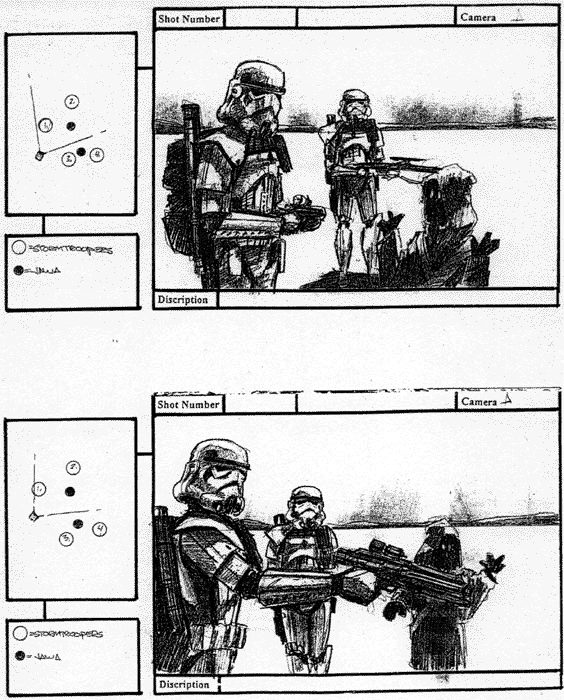
Sample storyboards from 'Troops' - a short film set in the Star Wars universe by Kevin Rubio & Co. Art Director - Eric Hilleary.
Storyboarding is the process of producing sketches of the shots of your script. The end result looks like comic book of your film (without the speech bubbles).
Why do it?
It helps you think about how your film is going to look. You can work faster on set and as pictures communicate better than words it will allow your camera crew to move their camera and lights, for producers to foresee problems, for the art department to know which parts of the location are going to be in shot and so on. Even the actors will get a feel of what they are going to be shooting!
So I need to be an artist?
Well you can be, but looking at storyboards by Hitchcock or Spielberg you have to admit that they can't draw. There are professional storyboard artists that can give you results that look better than the final film. However its a good idea to bash them out yourself, it allows you to experiment quickly and cheaply, testing out different versions of how a scene may look and play on camera.
Storyboarding is especially useful for complex visual sequences e.g. elaborate shots or special effects sequences. Sometimes a film only uses storyboards for difficult sequences other times the entire film is storyboarded. The Coen Brothers (Fargo, The Big Lebowski) storyboard extensively, allowing them to shoot just the sequences they require for editing, saving both time and money.
Hang on though, pictures are still, movies move.
Ah! You got me there. There are a few tricks storyboard artists have up their sleeves to illustrate movement - whether its movement within the frame (actors walking) or the frame moving itself (camera panning etc.).
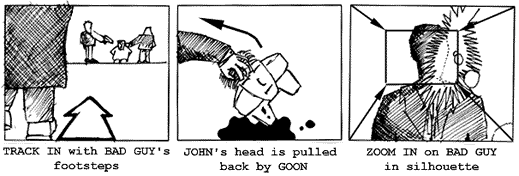
Arrows - Suppose the camera is tracking in, following a bad guy's footsteps. Draw in an arrow pointing into shot to show the camera's movement. Now the hero's head is pulled back by one of the bad guy's goons. Use an arrow to show the movement of the head being turned. What about a zoom in? From each corner draw in arrows pointing to the centre, draw in a new smaller frame to show the end of the zoom. Generally I try and use thick white arrows to show camera moves and thin black arrows to show objects moving.
The floating frame - What if you want to show the camera panning to show a cityscape, or following a character as they walk through an airport? There's two options here: 1) Illustrate one shot using more than one storyboard frame showing the key stages of the shot's movement across a number of frames or 2) Draw out the entire scene (e.g.. the horizon of a city) and place a frame on it with an arrow indicating the direction of movement.
Transitions - The storyboard can also include transitions in your film. Write these in the gaps between the frames e.g.. DISSOLVE TO :
Editing is one of the most creative aspects of filmmaking. The film editor, in conjunction with the director, establishes the pace and structure of a film by connecting various shots to create scenes and sequences that form the final movie. The shots the editor chooses and the ways they are combined set the mood, develop the action, create the rhythm, establish the film's time and space, and guide the viewers' attention. For a typical feature-length film, the editor begins with hundreds of thousands of feet of film and must reduce it to less than 10,000 feet.
In the 1920s, Russian filmmaker Lev Kuleshov conducted a series of experiments designed to demonstrate that when two separate shots are projected in succession, the viewer assumes a connection between them. In one experiment, Kuleshov spliced together a series of shots that had been taken in different places and at different times. The shots were of a waiting man, a walking woman, a gate, a staircase and a mansion. Kuleshov's viewers—who interpreted the sequence as a man and a woman meeting at the gate in front of the mansion—had, in essence, inferred a whole narrative on the basis of seeing only portions of it. This effect allows filmmakers to use exteriors and interiors miles apart and imply that they are in the same place, to have people filmed on different days appear to be talking to each other, to have actors seemingly facing dangerous situations, or to imply that what actors are thinking about is represented by a subsequent cutaway image.
The Kuleshov effect is an editing technique that illustrates how the human brain tries to find connections between objects when viewed together. Other editing techniques rely on how the human eye works. For example, there usually must be an appropriate change in distance for a shot not to seem like a mistake or "jump" cut. The direction in which things move across the screen is also an editorial concern. A car that exits the screen on the right is expected in a subsequent shot to reappear on the left—otherwise the car could be perceived as a different car coming from the opposite direction. Scenes featuring characters in opposition to each other (a hero and villain, for example) usually feature one character continually facing one direction with the other character continually facing the other direction. This keeps the two "sides" clear.
Storyboarding
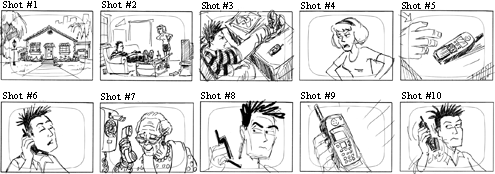
Here is an example of a shot list for the comic strip illustrated below.
1. LS - Exterior of house. Day. 2. LS - Mom to boy. Boy facing right, Mom facing left. "You should call your Grandma." 3. MS - Overhead. Boy staring at phone facing right. Phone on right side of screen. 4. CU - Mom's face. Mom facing left. "You should call your Grandma." 5. ECU - Boy picking up phone. Hand enters from left side of screen. 6. CU - Boy on phone. Phone on left side of screen. Boy's right ear. "Hello, Grandma." 7. CU - Grandma on phone. Grandma facing left. "Why don't you call more often?" 8. CU - Boy staring at phone. Phone on left side of screen. 9. ECU - Phone. Boy's hand on left side. 10. CU - Boy hanging up phone. Phone on left side of screen. Boy looking at phone.
What happens if, instead of the current sequence, the panels are placed in a different order?
Example #1—1, 7, 6, 9, 10, 2 ,3, 4, 5, 8 (Grandma has called the boy from her house and, after hanging up, the boy is told to call his Grandma by his Mom.) Example #2—5, 8,1, 7, 6, 9, 10, 2, 3, 4 (The boy calls Grandma, she admonishes him, the Mom says to call Grandma, and after he doesn't respond, reminds him again.)
Example #3—1, 3, 7, 5, 6, 9,10, 2, 4, 8 (The boy thinks about calling his Grandma, imagines what she would say, calls her, hangs up, and is told to call her by the Mom.)
Montage
Film editing can have its own unique logic as well, functioning in much the same manner as the brain with seemingly jumbled thoughts and images creating their own individual meaning. The groundwork for many of these techniques, later used by Alfred Hitchcock and others, was laid by a group of Soviet filmmakers—most notably Lev Kuleshov, Sergei Eisenstein and Vsevolod Pudovkin—who, in the early 1920s, began to experiment with film style and technique and especially with montage.
Montage, or collision editing, is done by splicing together a rapid sequence of carefully selected shots to evoke a specific emotional or intellectual response. The Russians' premise was that each shot derived meaning from the context in which it was placed. If the context changed, the meaning of the shot and the sequence also changed.
Montage, in the modern sense of the word, often refers to sequences where several shots have been edited together to compress a series of events that happen over time (e.g., sequences of young couples falling in love, scenes with flying calendar pages, etc.). Psycho
In Psycho, Alfred Hitchcock's famous shower scene uses a rapid series of extreme close-ups to build suspense and heighten the sense of panic. Many viewers believe they have seen a very brutal stabbing, even though the knife is never shown piercing the body of the victim.
Potemkin
This sequence in Sergei Eisenstein's 'Potemkin', one of the most famous in film history, recounts the brutal suppression of Russian workers and sympathizers following the death of proto-revolutionary figure Vakulinchuk onboard the Potemkin. Crewmen on the ship had mutinied due to oppressive working conditions and when they arrive at Odessa townspeople came to pay respects for Vakulinchuk and support the workers ... the film itself is based upon the failed 1905 Russian Revolution ... the Odessa sequence is a frightening precursor of government suppression of dissent throughout the 2Oth century, including, but certainly not limited, to Hungary (1956), Czechoslovakia (1968), Soweto (1976), Tiananmen Square (1989) - even Kent State (1970).
The Odessa Steps sequence in Eisenstein's The Battleship Potemkin, is the classic example of montage. In this sequence, the Czar's army is quashing an uprising. Eisenstein uses editing to show the fear of the people, their escalating panic, the tragedy of innocent bystanders as a baby in a carriage careens helplessly down the steps, and the intensifying threat of the soldiers, their guns and artillery.
For more information on narrative structures and post-production, click here and click here for class notes (courtesy and copyright of Prof. Christopher Moore).
JANET MURRAY: "HARBINGERS OF THE HOLODECK"
Murray, Janet. (1997). "Harbingers of the Holodeck", Hamlet on the Holodeck. New York: Free Press, 1997.
The final quarter of the twentieth century marks the beginning of the digital age. Starting in the 1970s, computers have become cheaper, faster, more capacious, and more connected to one another at exponential rates of improvement, merging previously disparate technologies of communication and representation into a single medium. The networked computer acts like a telephone in offering one-to-one real-time communication, like a television in broadcasting moving pictures, like an auditorium in bringing groups together for lectures and discussion, like a library in offering vast amounts of textual information for reference, like a museum in its ordered presentation of visual information, like a billboard, a radio, a gameboard, and even like a manuscript in its revival of scrolling text. All the major representational formats of the previous five thousand years of human history have now been translated into digital form. There is nothing that human beings have created that cannot be represented in this protean environment, from the cave paintings of Lascaux to real-time photographs of Jupiter, from the Dead Sea Scrolls to Shakespeare's First Folio, from walk-through models of Greek temples to Edison's first movies. And the digital domain is assimilating greater powers of representation all the time, as researchers try to build within it a virtual reality that is as deep and rich as reality itself.
The technical and economic cultivation of this fertile new medium of communication has led to several new varieties of narrative entertainment. These new storytelling formats vary from the shoot-'em-up videogame and the virtual dungeons of Internet role-playing games to the postmodern literary hypertext. This wide range of narrative art holds the promise of a new medium of expression that is as varied as the printed book or the moving picture. Yet it would be a mistake to compare the first fruits of a new medium too directly with the accustomed yield of older media. We cannot use the English theater of the Renaissance or the novel of the nineteenth century or even the average Hollywood film or television drama of the 1990s as the standard by which to judge work in a medium that is going through such rapid technical change.
In 1455, Gutenberg invented the printing press-but not the book as we know it. Books printed before 1501 are called incunabula; the word is derived from the Latin for swaddling clothes and is used to indicate that these books are the work of a technology still in its infancy. It took fifty years of experimentation and more to establish such conventions as legible typefaces and proof sheet corrections; page numbering and paragraphing; and title pages, prefaces, and chapter divisions, which together made the published book a coherent means of communication. The garish videogames and tangled Web sites of the current digital environment are part of a similar period of technical evolution, part of a similar struggle for the conventions of coherent communication.'
Similarly, new narrative traditions do not arise out of the blue. A particular technology of communication-the printing press, the movie camera, the radio-may startle us when it first arrives on the scene, but the traditions of storytelling are continuous and feed into one another both in content and in form. The first published books were taken from the manuscript tradition. Malory's Morte darthur, written in manuscript in 1470, drew on prose and poetry versions of the Carnelot legend in both French and English, which in turn drew on centuries of oral storytelling. The elements of the story were all there already: the rise and fall of the hero Arthur, the gallantry of the knights, the love between Guinevere and Lancelot, and the destruction of the Round Table through civil war. But Malory's prose brought these elements together and introduced colloquial dialogue, more consistent plotting, and a pervasive tone of nostalgia. Fifteen years later, William Caxton took Malory's separate tales and bound them together into a single volume, with descriptive chapter headings that lured readers into the story. Only then, after such long episodic narratives were commonplace in publishing, could Cervantes write a contemporary tale like Don Quixote (1605), which marks the begin, ning of the European novel.
We can see the same continuities in the tradition that runs from nineteenth-century novels to contemporary movies. Decades before the invention of the motion picture camera, the prose fiction of the nineteenth century began to experiment with filmic techniques. We can catch glimpses of the coming cinema in Emily Brontë's complex use of flashback, in Dickens' crosscuts between intersecting stories, and in Tolstoy's battlefield panoramas that dissolve into close-up vignettes of a single soldier. Though still bound to the printed page, storytellers were already striving toward juxtapositions that were easier to manage with images than with words.
Now, in the incunabular days of the narrative computer, we can see how twentieth-century novels, films, and plays have been steadily pushing against the boundaries of linear storytelling. We therefore have to start our survey of the harbingers of the holodeck with a look at multiform stories, that is, linear narratives straining against the boundary of predigital media like a two-dimensional picture trying to burst out of its frame.
Click here to read the rest of the article and learn about "mutliform" narrative.
Some of the terminology that a film editor uses includes:
Close-up (CU): A shot showing a detail only (ex., face only or hands only).
Cross-cutting: Cutting back and forth between two or more events or actions that are taking place at the same time but in different places. Cross-cutting is used to build suspense or to show how different pieces of the action are related.
Cut:An abrupt transition from one shot to another.
Cutaways: A cut away from the primary subject to something the filmmaker has decided is equally or more relevant at that time. Often cutaways consist of shots showing the reaction of one character to another. This is often used to compress time in what appears to be a seamless manner.
Dissolve: An overlapping transition between scenes where one image fades out as another fades in. Editors often use this to indicate a change in time and/or location.
Establishing Shot: A shot, usually taken from a distance, which establishes for the viewer where the action is to occur and the spatial relationship of the characters and their setting.
Extreme Close-Up(ECU): A detail of a close-up (eyes or mouth only, etc.).
Fade In: A shot that starts in darkness and gradually lightens to full exposure.
Fade Out: A shot that starts at full exposure and gradually fades to black.
Freeze-Frame: At a chosen point in a scene, a particular frame is printed repeatedly, given the effect of halting or "freezing" the action.
Jump Cut: A cut where two spliced shots do not match in terms of time or place. A jump cut gives the effect that the camera is literally jumping around.
Long Shot (LS): A shot taken at a considerable distance from the subject. A long shot of a person is one in which the entire body is in frame.
Medium Shot (MS): A shot framing a subject at a medium range, usually a shot from the waist up.
Reverse cutting: A technique alternating over-the-shoulder shots showing different characters speaking. This is generally used in conversation scenes.
Sequence Shot: An entire scene or sequence that is one continuous camera shot. There is no editing.
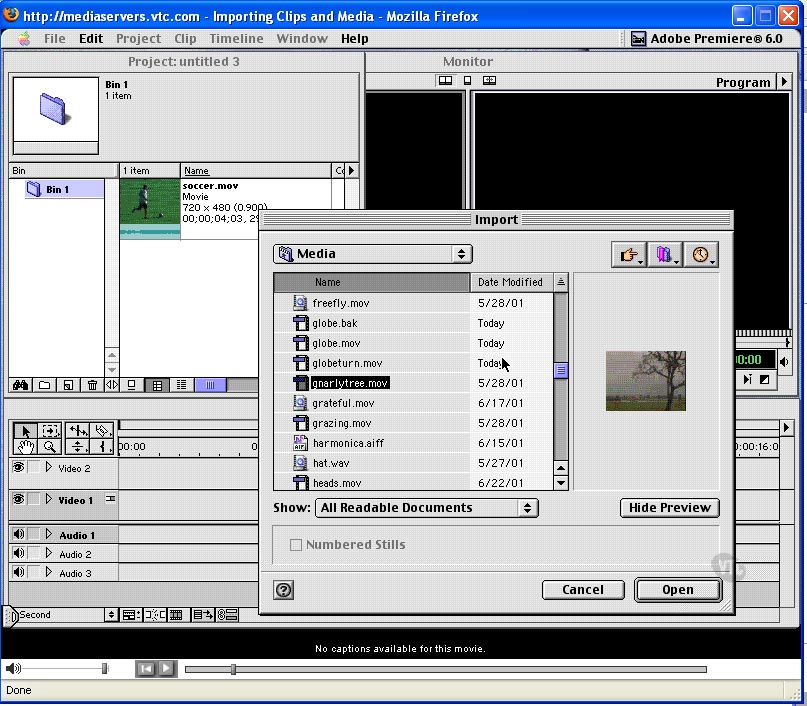
For some of the basic aspects of Adobe Premier 6, there are some excellent tutorial quicktime movies that you can view, for free, on the web. Take a look at these to help remind you of some of the functions that we'll be learning.
Introduction What's New in Premiere 6(03:13) Overview of Premiere(06:14)
Premiere's Interface The Project Window(06:58) The Monitor Window(06:42) The Timeline Window(05:10) Menus(16:35) Palettes(06:09) Setting Preferences(11:06)
Media Acquisition Digital and Analog Compared(05:28) Capturing Digital Video(10:36) Capturing Analog Video(08:08) Batch Capture/Device Control(03:54) Capturing Time-Lapse Video(06:34) Capturing Audio(06:48) Working with Timecode(10:55) Importing Clips and Media(08:27) Saving Projects/Offline Files(05:46)